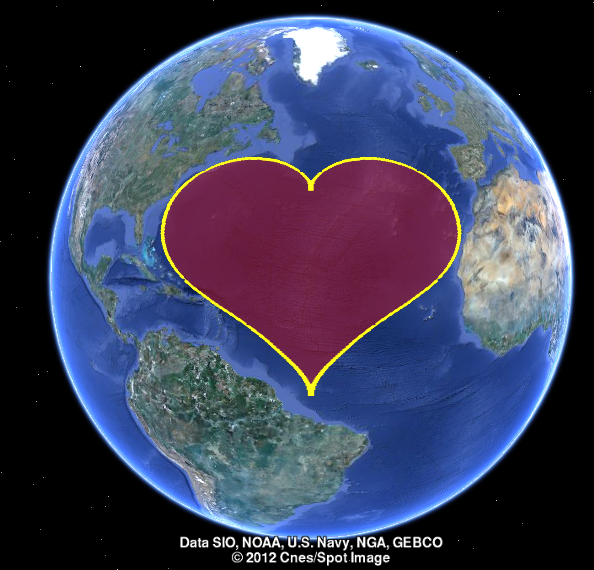
| function line2kml(kmlfile,long,lat,varargin) % convert a line to a kml line or polygon feature file with limited % attributes support % usage: % line2kml(kml-filename,longitude,latitude [, other opts]) % opts: % 'style' : polygon or line % 'linecolor' : color of edge line % 'linealpha' : alpha value for edgecolor [1-255] % 'linewidth' : width of the edge line % 'fillcolor' : facecolor of the polygon % 'fillalpha' : alpha value for facecolor [1-255] % e.g., % np=1000; % t=0:2*pi/np:2*pi; % r=sin(t).*sqrt(abs(cos(t)))./(sin(t)+7/5)-2*sin(t)+2; % long=r.*cos(t); lat=r.*sin(t); % long=long/max(abs(long))*31-45; % lat=lat/max(abs(lat))*35+38; % line2kml('myheart',long,lat,'fillalpha',127,'style','polygon','linewidth',5,'linecolor','y','linealpha',255,'fillcolor','r'); % will produce a kml file named myheart in current folder % % @ http://scriptdemo.blogspot.com % demo case if nargin==0 np=1000; t=0:2*pi/np:2*pi; r=sin(t).*sqrt(abs(cos(t)))./(sin(t)+7/5)-2*sin(t)+2; long=r.*cos(t); lat=r.*sin(t); long=long/max(abs(long))*31-45; lat=lat/max(abs(lat))*35+38; line2kml('myheart',long,lat,'style','polygon','fillcolor','r','fillalpha',127,'linecolor','y','linewidth',5,'linealpha',255); disp(['Please open the myheart.kml file and have a look in GoogleEarth!']) return end if nargin<3 help line2kml return end % check input arguments mykml.type='Polygon'; mykml.linecolor='r'; mykml.linecolorstr='r'; mykml.linewidth=1; mykml.fillcolor='r'; mykml.fillcolorstr='7f0000ff'; mykml.linealpha=127; mykml.fillalpha=127; while(size(varargin,2)>0) switch lower(varargin{1}) case {'type','style'} mykml.type=varargin{2}; varargin(1:2)=[]; case {'linewidth','lw'} mykml.linewidth=varargin{2}; varargin(1:2)=[]; case {'linecolor','lc'} mykml.linecolor=varargin{2}; varargin(1:2)=[]; case {'linealpha','linetransparency'} mykml.linealpha=varargin{2}; varargin(1:2)=[]; case {'fillalpha','filltransparency','facealpha'} mykml.fillalpha=varargin{2}; varargin(1:2)=[]; case {'fillcolor','fcolor'} mykml.fillcolor=varargin{2}; varargin(1:2)=[]; otherwise disp(['Unknown property: ',varargin{1}]) return end end mykml.linecolorstr=getColor(mykml.linecolor,mykml.linealpha); mykml.fillcolorstr=getColor(mykml.fillcolor,mykml.fillalpha); fid=fopen([kmlfile,'.kml'],'wt'); writekmlHeader(fid,kmlfile); long=reshape(long,1,[]); lat=reshape(lat,1,[]); switch (mykml.type) case {'Polygon','polygon','poly'} fprintf(fid,'%s \n','<Style id="idpolyfill">'); fprintf(fid,'%s \n','<LineStyle>'); fprintf(fid,'%s \n',['<color>',mykml.linecolorstr,'</color>']); fprintf(fid,'%s \n',['<width>',num2str(mykml.linewidth),'</width>']); fprintf(fid,'%s \n','</LineStyle>'); fprintf(fid,'%s \n','<PolyStyle>'); fprintf(fid,'%s \n',['<color>',mykml.fillcolorstr,'</color>']); fprintf(fid,'%s \n','</PolyStyle>'); fprintf(fid,'%s \n','</Style>'); fprintf(fid,'%s \n','<Placemark>'); fprintf(fid,'%s \n',['<name>',kmlfile,'</name>']); fprintf(fid,'%s \n','<styleUrl>#idpolyfill</styleUrl>'); fprintf(fid,'%s \n','<Polygon>'); fprintf(fid,'%s \n','<tessellate>1</tessellate>'); % fprintf(fid,'%s \n','<outerBoundaryIs>'); fprintf(fid,'%s \n','<LinearRing>'); case {'line'} fprintf(fid,'%s \n','<Style id="idlineOnly">'); fprintf(fid,'%s \n','<LineStyle>'); fprintf(fid,'%s \n',['<color>',mykml.linecolorstr,'</color>']); fprintf(fid,'%s \n',['<width>',num2str(mykml.linewidth),'</width>']); fprintf(fid,'%s \n','</LineStyle>'); fprintf(fid,'%s \n','</Style>'); fprintf(fid,'%s \n','<Placemark>'); fprintf(fid,'%s \n',['<name>',kmlfile,'</name>']); fprintf(fid,'%s \n','<styleUrl>#idlineOnly</styleUrl>'); fprintf(fid,'%s \n','<LineString>'); fprintf(fid,'%s \n','<tessellate>1</tessellate>'); % otherwise disp('Not defined') end fprintf(fid,'%s \n','<coordinates>'); %fprintf(fid,'%0.6f, %0.6f, 0.0 \n', [long;lat]); fprintf(fid,'%0.6f,%0.6f,0 \n', [long;lat]); % update for new version google earth, 2012.10 fprintf(fid,'%s \n','</coordinates>'); switch (mykml.type) case {'Polygon','polygon','poly'} fprintf(fid,'%s \n','</LinearRing>'); fprintf(fid,'%s \n','</outerBoundaryIs>'); fprintf(fid,'%s \n','</Polygon>'); case {'line'} fprintf(fid,'%s \n','</LineString>'); otherwise disp('Not defined') end fprintf(fid,'%s \n','</Placemark>'); writekmlEnd(fid); fclose(fid); function writekmlHeader(fid,kmlName) fprintf(fid,'%s \n','<?xml version="1.0" encoding="UTF-8"?>'); fprintf(fid,'%s','<kml xmlns="http://www.opengis.net/kml/2.2" xmlns:gx="http://www.google.com/kml/ext/2.2" '); fprintf(fid,'%s \n','xmlns:kml="http://www.opengis.net/kml/2.2" xmlns:atom="http://www.w3.org/2005/Atom">'); fprintf(fid,'%s \n','<Document>'); fprintf(fid,'%s \n',['<name>',kmlName,'.kml</name>']); function writekmlEnd(fid) fprintf(fid,'%s \n','</Document>'); fprintf(fid,'%s \n','</kml>'); function colorHex=getColor(colorRGB,alpha) colorHex='00000000'; if ischar(colorRGB) switch lower(colorRGB) case {'r','red'} colorHex(1:6)='FF0000'; case {'g','green'} colorHex(1:6)='00FF00'; case {'b','blue'} colorHex(1:6)='0000FF'; case {'k','black'} colorHex(1:6)='000000'; case {'y','yellow'} colorHex(1:6)='FFFF00'; case {'m','p'} colorHex(1:6)='FF00FF'; otherwise error(['Unkow color option: ',colorRGB]) end else if (max(colorRGB)>1) colorHex(1:2)=dec2hex(round(colorRGB(1)),2); colorHex(3:4)=dec2hex(round(colorRGB(2)),2); colorHex(5:6)=dec2hex(round(colorRGB(3)),2); else colorHex(1:2)=dec2hex(round(colorRGB(1)*255),2); colorHex(3:4)=dec2hex(round(colorRGB(2)*255),2); colorHex(5:6)=dec2hex(round(colorRGB(3)*255),2); end end if alpha>1 colorHex(7:8)=dec2hex(round(alpha),2); else colorHex(7:8)=dec2hex(round(alpha*255),2); end colorHex=colorHex([7 8 5 6 3 4 1 2]); |